Reading a Learning Rate Finder Plot
How to run a learning rate range test and pick a starting value from the loss curve it produces.
Choosing a learning rate by trial and error is slow. Every guess costs a full training run, and most guesses are either too timid to make progress or so large that the loss blows up. A learning rate range test gives us a better first guess in a few hundred steps. We train briefly while increasing the learning rate, record the loss at each step, and read a sensible value off the resulting plot.
This post walks through what the test does, how to write it in a few lines of Python, and how to read the plot without fooling ourselves.
What the test does
The idea is simple. We start from a freshly initialised model and a very small learning rate, say 1e-7. After each mini-batch we multiply the learning rate by a constant factor, so that after a few hundred steps it has grown to something absurd, like 10. Along the way we record the training loss.
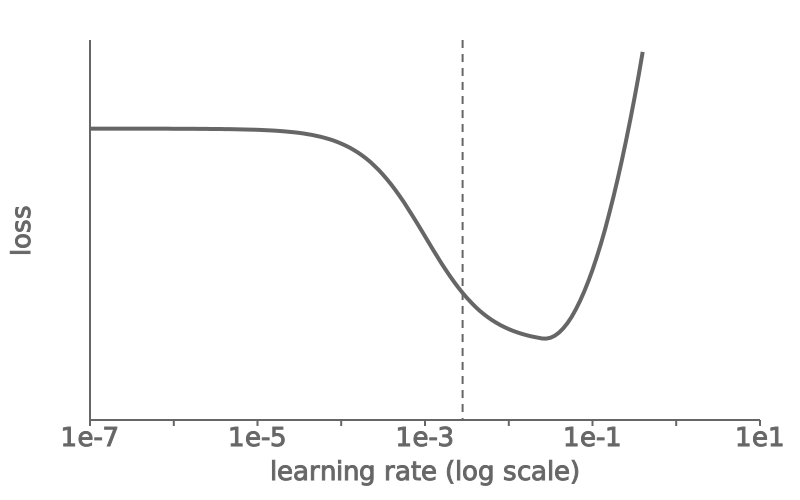
At first the learning rate is too small to change anything, so the loss stays flat. Then there is a range where the model starts to learn and the loss falls quickly. Finally the steps become too large, the updates overshoot, and the loss shoots up. The useful information is where the fast descent happens.
The test does not find the best learning rate. It finds the range where training is stable and productive, which is a good place to start.
Running the test
The exponential schedule
Because useful learning rates span several orders of magnitude, we grow the rate exponentially rather than linearly. With n steps between lr_min and lr_max, the factor per step is (lr_max / lr_min) ** (1 / n). That gives equal attention to each decade.
import math

def lr_range_test(model, loader, optimizer, loss_fn,
                  lr_min=1e-7, lr_max=10.0, steps=200):
    """Return (learning_rates, losses) from one short sweep."""
    factor = (lr_max / lr_min) ** (1 / steps)
    lr, history = lr_min, []
    for step, (x, y) in enumerate(loader):
        if step == steps:
            break
        for group in optimizer.param_groups:
            group["lr"] = lr
        optimizer.zero_grad()
        loss = loss_fn(model(x), y)
        loss.backward()
        optimizer.step()
        history.append((lr, loss.item()))
        if math.isnan(loss.item()):
            break  # no point continuing once the loss diverges
        lr *= factor
    return tuple(zip(*history))
Two details matter. We stop as soon as the loss becomes nan, because nothing after that point is informative. And we run the test on a copy of the model, or reload the initial weights afterwards, because the sweep leaves the weights in a damaged state.
Smoothing the loss
Mini-batch losses are noisy, and the raw curve is hard to read. An exponential moving average with a factor around 0.98 removes most of the jitter without shifting the curve too far to the right. If the smoothed curve still looks ragged, the batch size is probably too small for the test to be useful.
Reading the plot
We plot the smoothed loss against the learning rate on a logarithmic x-axis. A typical result looks like the figure below: a flat plateau on the left, a steep valley in the middle, and a sharp rise on the right.
Where to pick
It is tempting to pick the learning rate at the minimum of the curve. That is usually too high: by the time the loss bottoms out, the rate is already close to the point of divergence, and in a real run the loss landscape changes as the model improves. Two rules of thumb work well in practice:
- Take the learning rate at the minimum and divide it by ten.
- Take the point where the loss is falling most steeply, which is often in the same place.
When the two disagree by more than a factor of three or so, the plot is telling us that the test was too noisy. Running it again with a larger batch or more steps usually settles the question.
Common mistakes
A few things make the plot misleading. Running the test with a learning rate schedule or warm-up already active means two schedules fight each other. Running it with heavy regularisation or a very different batch size than the real run means the result does not transfer. And reading the plot on a linear x-axis compresses the interesting region into a few pixels.
The range test is cheap, so it is worth repeating whenever the model, the optimiser or the batch size changes. It will not replace a proper search, but it turns the first guess from a shot in the dark into an informed estimate.